Amazon Best Products with minimum price

Monday, 23 October 2017

PHP Quiz (Question and Answer) - Function

This is set of multiple choice question PHP function. Please write your answer in comment section.

A) Type Hinting was introduce in which vesion of PHP ?

  1. PHP 5
  2. PHP 5.4
  3. PHP 4
  4. PHP 7

B) What will be the output of the follwing code.

  1. <?php
  2.     function calculation($price, $GST="")
  3.     {
  4.         $total = $price + ($price * $GST);
  5.         echo "$total"; 
  6.     }
  7.     calculation(42); 
  8.     ?>

  1. Error
  2. 0
  3. 42
  4. 21


C) What will be the output of following PHP Code. 

    1. <?php
    2.     function abc()  
    3.     {
    4.         function bcd()
    5.         {
    6.             echo 'I am bcd';
    7.   }
    8.         echo 'I am abc';
    9.     }
    10.     bcd();
    11.     abc();
    12.     ?>

  1. I am bcd
  2. I am abc
  3. Error
  4. I am bcd I am abc
  5. I am abc I am bcd


Please Friends Write your answer in comment section.

Thank You

Wednesday, 11 October 2017

Avoid these 10 Google AdWords Mistakes :The Beginners Guide

Google AdWords is huge in itself and every mistake cost us money and lower ROI (Return on Investment). Campaigns in Google AdWords if not managed properly can cost more than the return, it's all about how much you know AdWords and how well you can manage the campaigns.

So, guys in this post we'll discuss the top 10 mistakes you should avoid for a highly successful AdWords campaign.

AdWords Mistake #1 : Focusing on wrong keywords, not grouping the keywords properly, and the match type used for these keywords.

Mostly, everyone thinks keywords with high search volumes are the best it is true but you should use these keywords as very targeted (not as broad match type) especially if you have limited budget as it will provide little to no conversions.

Your campaigns structure should be like campaigns then ad groups then ads and then keywords. Not using ad groups is one of the biggest mistake done. But it's recommend that the ad being shown should match the keyword being searched. The closer ad copy and keyword matches, more likely are people to click on the ad. The best thumb rule states that to not use more than 20 keywords per ad group. Let's look at this example:

Sony sells several different products. They sell laptops, tablets, mobiles etc. If they don't break up their products into different ad groups, they wouldn't be able to show the specific ads based on what people are searching for.

Use the right kind of mach types of keywords as it impacts your ads:


Match Type
Impressions
Conversions
Broad
 High
Low
Phrase / Exact
Significantly Fewer
High

A good approach is to start with exact matches and then expand to phrase and broad as needed or start with broad and then expand to phrase and broad match type.

AdWords Mistake #2 : Not using Negative keywords.
Negative keywords are those keywords that are not a good match to your ads. They can be added at both the campaigns and ad group level. For example, if you sell men's round neck t-shirts but not men's v neck t-shirt, then you won't want your ads to show up on searches for " men's v neck t-shirt", but do want them to show up on searches for " men's t -shirt". Add, "v neck" as a negative keyword, then your ads won't be shown for any searches that include the word "v neck".


In order to find out the words that should be added as negative, you can use the search term report in Google AdWords or  dig into Google Analytics ( within analytics, click on "Acquisition", then "AdWords", and then "Matched Search Queries", next click on " Query Match Type" and then either "broad match" or "phrase match" to view the exact keyword phrases people are searching for.

AdWords Mistake #3 : Not bidding on your own brand keywords

Many people don't bid on their brand thinking they already are ranking for their own brand, so should they advertise. But if you don't advertise other companies will by creating an ad group and target your visitors. Therefore, bidding on your brand will help you to dominate Google SERPs which is great for building brand awareness and reputation.  

AdWords Mistake #4 : Keep testing your ad copy, bid price and landing pages.

You should keep testing  your ad copy, either try 2 different headline variations, with same body copy but with different call to action or adding various  ad extensions. Testing basically with different variations will help you to know what works best. Resulting into increase of click-through and/or conversions. You'll never know until you test.

AdWords Mistake #5 : Not doing proper research in order to know who your competitors are.

You need to know who you're competing against, what keywords they're using, and what their landing page looks like. Scan your competitors' ad copy to see what you can learn and apply. See their landing pages to see how you can improve your pages. Once this is done, test the new ad copy and landing pages with the old ones and see if their is any difference or not.

AdWords Mistake #6 : Not testing the optimal ad position.

Sometimes it is said that for brand awareness its good to be in top two ad positions, but for better results it's better to be in position 3-5. Therefore, without testing you can't decide which ad position is the best for your business. Test to find the optimal position by raising or lowering your bid on cost per click (CPC).

AdWords Mistake #7 : Not having a dedicated landing page.

One of the biggest mistakes that AdWords beginners make is driving paid traffic to their homepage. Homepage is great for explaining what your business is about, but not effective for a landing page at getting conversions. Each campaigns needs to have a specific campaign objective in mind before you set it up in order to get maximum return from your ad. Therefore, direct visitors to the appropriate product or category page.

AdWords Mistake #8 : Set up proper tracking

You need to set up conversion tracking or direct your AdWords traffic to dedicated purchase pages that allow you to track how much return is being generated by each of your Google AdWords campaigns. This included AdWords, Bing, Google Analytics etc. before paying for a single click.


AdWords Mistake #9 : Setting up Clear Goals
You need to know exactly what you want, from your advertising to accomplish before doing anything else. Many companies skip this step and just start spending therefore, their results never live up to their expectations. Always set your goals first and make decisions towards those goals.
AdWords Mistake #10 : Pay attention to your landing page experience.
As it is this page that will lead your customers to convert. Paid search won't fix a bad landing page or a shopping cart experience.It's better to take people to a landing page or a product or category page where people will see a direct match to the ad they clicked.
Conclusion
There is no specific process to being successful with Google AdWords, but there are number of tips, tricks and rules that help one to optimize your campaigns to maximize your returns.
Make a point to regularly check your campaigns and constantly look for places to make improvements and keep testing.Avoiding these mistakes can make your Google AdWords Campaigns run effectively and efficiently. 
That's all from my end...

If you have any queries, feel free to write in comments down below..
Stay tuned for more digital advertising!!

Thank You...


Monday, 9 October 2017

How is Search Terms Report beneficial in Google AdWords?

Search terms report is most important sources of data in your campaigns. Search terms report helps you in showing what exactly people who saw your ads and clicked on it were searching for. Its list of search terms that people have used before seeing your ad and clicking it.

It helps you to optimize your search campaigns in Google AdWords and save money by adding new keywords and negative keywords, as by knowing which search queries triggered your ads and how they performed. Therefore, use it to refine keywords so that only the right searches show your ad.As, this report shows every search query that resulted in your ad being shown or clicked.

For, AdWords Search Term Report follow the steps:

1.  Click the Keywords Tab.
2.  Then in the keywords tab you will see the search term tab.
3. You can also download the the data and also modify which columns show by clicking the columns drop - down menu, and the selecting modify columns. It allows you to add, remove, or reorder the columns in your report.

Note: Search terms that were used by people at least 8 hours ago will be shown or have received clicks in the past 30 days or were searched for by a significant number of people. Those search terms that did not met this criteria will be put up in the "other search terms" row.


Example:

Rojer is looking to buy a Electronic covers online. He types " mobile covers" into the search box on Google. "Mobile covers" is the search term. Let's say you're the owner of an online electronic business. Because you have included the word "laptop" as a keyword in your AdWords campaigns, your ad may be eligible to show on Rojer's search results page. 

The Search Terms report full of opportunities:

A) New Keywords:

See the report for queries that performed well and aren't yet in your campaigns as exact match. Search terms report is full of new keyword opportunities.

To find the keyword opportunities in your report:

1. Sort the terms by highest clicks to see which queries are performing best.
2. Start from top, review the search queries row wise by looking at their CTR and conversion rates.
3. Note which keywords are performing well and add them as exact match keywords. 

B) Negative Keywords:

The report also shows irrelevant queries that you want to avoid advertising. Finding negative keywords help in boosting CTR & Quality Score. As, when you add them as negative keywords  it helps you in saving money directly and improve your cost per conversion. For example, if you sell round neck t-shirts, and you see that the search term "v neck t-shirts" is triggering your ads, you might want to add "v neck" as a negative keyword.

C) Select the correct match type (e.g. broad, phrase, exact, or negative) for existing keywords. The "match type" column can help you understand how keyword match type is affecting your ad performance.

How the match type is determined

When the search term match type is close variation, this includes misspellings, singular and plural forms, acronyms, stem words ( such as floor and flooring), abbreviations etc.

That's all from my end...

If you have any queries, feel free to write in comments down below..

Stay tuned for more digital advertising!!

Thank You...


Wednesday, 4 October 2017

Reasons why you should be using Google AdWords !

The biggest advantage of Google AdWords advertising is that you can test new business ideas quickly  by running an ad campaign for few hours and monitoring its results.

Following are the Reasons:

1) The Google audience/user base has traditionally catered to technical audiences and more importantly, to internet savvy users.

2) Google AdWords delivers instant results - you can have your ad campaign u and running in 10 minutes flat. Compared to other search engines.

3) With AdWords, you can go target your prospects geographically down to countries, states and cities. This is a great advantage for business selling hard goods or services -  they would prefer local prospects as opposed to someone half way across the world.

4) It rewards good ad performance for an ad that converts (clicks/impressions percentage) exceptionally well ( high click through rate CTR), your ad will get better ad placements as well as better pricing. Google wants to display the most relevant ads for the user. Therefore, in tern you end up paying less per click, the higher the click through rate of your ad is.


Image result for google adwords images

Note: Click through Rate is simply the percentage that users click on your ad. For example, if 200 users saw your ad, and 4 people clicked your ad to visit your website, your CTR (Click through Rate ) would be 2%. ({4/200} x 100)

Before this research your market and your competition and that means knowing:


  • Which keywords are getting the most traffic?
  • What are the top bid prices for those keywords?
  • Which keywords are being ignored and why?
  • How many competitors you will have?
How to write Good Keywords?

Let me show you how to select great keywords...

Think like your customers
  • Create a group of ads or ad group for each of your products and services. For each ad group, pick up at least 20  relevant keywords.
  • As you pick your keywords, think like your potential customers. What are they searching for? What words would they use to describe your product?
Use Themes
  • To show more relevant ads to potential customers, group your keywords into themes that are based o your different products and services. For example, you can create one group of keywords about the laptops that you sell and another group about the mobile phones you offer.
  • Using specific keywords means that your ad can appear when potential customers search for terms that are relevant to your business.
That's it from my side...


If you have any queries, feel free to write in comments down below..

Stay tuned for more digital advertising!!

Thank You...


Tuesday, 3 October 2017

CodeIgniter 4 Configuration and Installation (Tutorial Part 1)

Welcome to CodeIgniter 4:

CodeIgniter Comes in three flavors: CodeIgniter 3 (Current), CodeIgniter 4 (Future) and CodeIgniter 2 (Legacy)

CodeIgniter is a lightweight Framework (Released in 2006). CodeIgniter is very easy to install, within half an hour you can run your program by CodeIgniter. It works nicely on almost all Shared and Dedicated hosting Platforms.Currently required PHP version is 5.2.4.


Server Requirements:

PHP version 7.0.15 or newer is required, with intl extension installed.

Database is required in almost all web application, for the CI4 the database requirement is:

  • MySQL(5.1+) via the MySQLi driver
  • PostgreSQL via the Postgre driver
Installation:

There are two ways to install CI4 : Manually and Composer

1) Manual Installation:

You can download the file from the official website of Codeigniter, please click HERE to download the CI4 file.

2) Composer Installation:

Now CI can be installed via Composer create-project command.

composer create-project codeigniter4/framework

Running: 

1) Upload the unzip file to your local machine or server. In CI4 , the index.php file will be in public folder inside project root.

The Big Change to the previous version is that there is now a public directory, for the security related reason it is necessary for separation of application/Framework and public (JS, CSS, Images etc). The document root will no longer be placed in the root directory of CodeIgniter, but Now in the public Folder.

2)  For setting the base URL, session , encryption key etc you will need to open the App.php file for configuration.

Open the application/Config/App.php file with any text editor and set your base URL.

3) For the setting database Configuration, open the application/Config/Database.php with any text Editor and set your database setting.

For the security reason, both the system and any application can be placed above the web root so that they are not directly accessible via any browser.

If anyone wants to keep there view file public, it is also possible in CI4 via move the view directory from application directory to corresponding folder inside the public directory. After this you need to open your main index.php file and set the $system_path, $application_folder and $view_folder variables preferably full path (eg: /www/domain/system).

Stay tuned to learn how CI4 works in my next blog...

Thank you

Monday, 2 October 2017

CodeIgniter 4 (Big Move for the Future)

CodeIgniter is a PHP full-stack  Web Framework that is light, fast, flexible, easy to implement, easy to setup, rich library and Secure. If you want to know more information, about the CodeIgniter Framework please click HERE for further details about CodeIgniter.

CodeIginiter Framework which was originally developed by EllisLab was adopted by BCIT(British Columbia Institute of Technology).

CodeIgniter Community has already launched their current version which is 3.x but there are many competitor of Codeigniter framework and Now days everyone needs to be updated for better opportunity.

So, CodeIgniter had compared to Laravel fewer changes to score with developers, because the competitor framework's functionality and coding style were always a bit better.

Now the good news for Codeigniter Framework Developers i.e Codeigniter4 Development version is already launched.


BIG MOVE FOR THE FUTURE:

In the official CodeIgniter forum, Already announced on 26-06-2016 that the first milestone of CI4 has now been achieved. Now CodeIgniter Community Launched the Development version of CI4 for there Developers.

For Downloading the CI4  Development Version and the documentation please click HERE, Please note this is the development version so this is not finished yet.

The Big Change to the previous version is that there is now a public directory, for the security related reason it is necessary to the separation of application/Framework and public (JS, CSS, Images etc). The document root will no longer be placed in the root directory of CodeIgniter, but Now in the public Folder.

vhost configuration now looms  like this:

<VirtualHost *:80>
ServerName codeigniter4.local
DocumentRoot /var/www/vhosts/codeigniter4.local/public/
</VirtualHost>

SIGNIFICANT CHANGES:

Now the minimum requirement for the PHP interpreter was set relatively high.So for the Installation and Operation PHP > 7.0 is required.

CI4 is now ready for database migration and seeds like Laravel PHP Framework. So the deployment itself and also deploying changes is now  much easier, because database adjustment no longer do this manually. Now this will happen by automatically.

INSTALLATION:

The Most interesting part now CI Developers can Install the CodeIgniter by Composer (Like Laravel) and Manually.

For the Installing , Configuration and the CodeIgniter4 Tutorial please wait for my New Post.

Thank You.

Do leave your comments down below in case of any query..

Monday, 5 June 2017

Universal App Campaign in Google AdWords.

Got an app or apps and want to promote them to your target audience, Universal App Campaigns is the best solution which makes promotion of your Android or iOS apps across Google Search, Play, YouTube, and within other apps and mobile websites on the Display Network.

In Universal App Campaign, you don't need to design individual ads. Instead, Google uses your ad text ideas and assets from your app store listing in order to design variety if ads across several formats and networks. Along with that Google tells you to only provide some text, a start bid and budget, language and locations for your ads.

These ads appear across Google's properties. This includes Google Search and Google Play, as well as our search partners, YouTube, the Google Display Network, AdMob, and many more publishers who host app ads.

Universal App Campaigns offers two different optimization options:

1. Focus on getting more installs: For getting new users for your App. Google AdWords will optimize the bid and targeting to get the greatest number of new users for your app.

2. Focus on driving selected in-app actions: For getting new users who are likely to complete the in-app actions that you have selected as a conversion. Google AdWords will focus on poeple who are most likely to complete the process.

Creating Universal App Campaign

1. Sign in to your AdWords Account.
2. Click Campaigns in the page menu to reach campaign page, and click the + button.
3. In the Campaign type, select and click on Universal App Campaign.


4. In the Select Campaign Setting Page, give your campaign a name. Then, select the app from the drop down or Click Add a new app  to enter one.


5. In the "Ads" section, you need to enter 4 lines of text that can be rotated in your ads in any order.

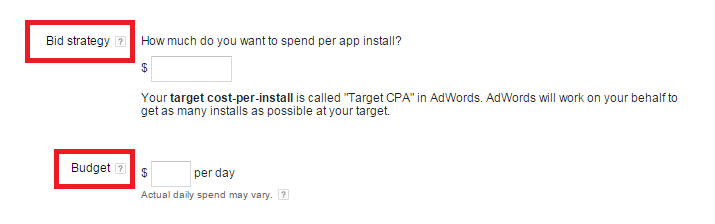
6. Set up the bid and the budget per day.


7. You can advertise on YouTube by adding up to 5 videos, in case you leave it blank, Google AdWords might make a video for you. But this option is Optional.

8. Upload Image for your ads. You can add up to 10 image files with a maximum size of 150KB as.jpg, .gif, or .png. But this option is also Optional.

9. Update the location and language settings. As, Google AdWords doesn't translate your ads, therefore target only those languages that match your ads.

10. In Campaign Optimization select to optimize your campaign for: Get new users for your app or Get new users who are likely to complete in-app actions.

11. Click Save and Continue. If having conversion tracking set up, Google AdWords can count installs as conversions for Android Apps in the Google Play store automatically.

That's all from my end...

If you have any queries, feel free to write in comments down below..

Stay tuned for more digital advertising!!

Thank You...